

What Is a 3D Parts Catalog? (And When Should Manufacturers Use One?)
What Is a 3D Parts Catalog?
(And When Should Manufacturers Use One?)
Picture this: a technician calls your parts support line. They need a gas valve for a machine. Your parts rep opens a binder, an actual three-ring binder, flips to the G section, finds photos of gas valves, and hopes there is a handwritten note somewhere indicating which machine it fits. If not, they start making calls. They email photos back and forth. They pull an engineer off their actual job to help identify the replacement component for the customer’s unit. An hour later, maybe the right part gets ordered.
This is a real scenario witnessed firsthand at a complex equipment manufacturer; a company that had 3D CAD data the whole time. They just had no way to turn it into something their parts team could use.
3D parts catalogs exist to close that gap. The gap when an equipment manufacturer does not have 2D exploded views and doesn’t have the bandwidth or time to create 2D parts catalogs. And the gap when your customers just need an accurate and intuitive way to identify the parts they need for your complex equipment.
What Is a 3D Parts Catalog?
A 3D parts catalog, sometimes called a 3D parts manual or 3D electronic parts catalog (EPC), allows OEMs to rapidly and securely deploy 3D data of your equipment, allowing your customers and dealers to identify and order parts by interacting directly with a three-dimensional model of a machine or assembly.
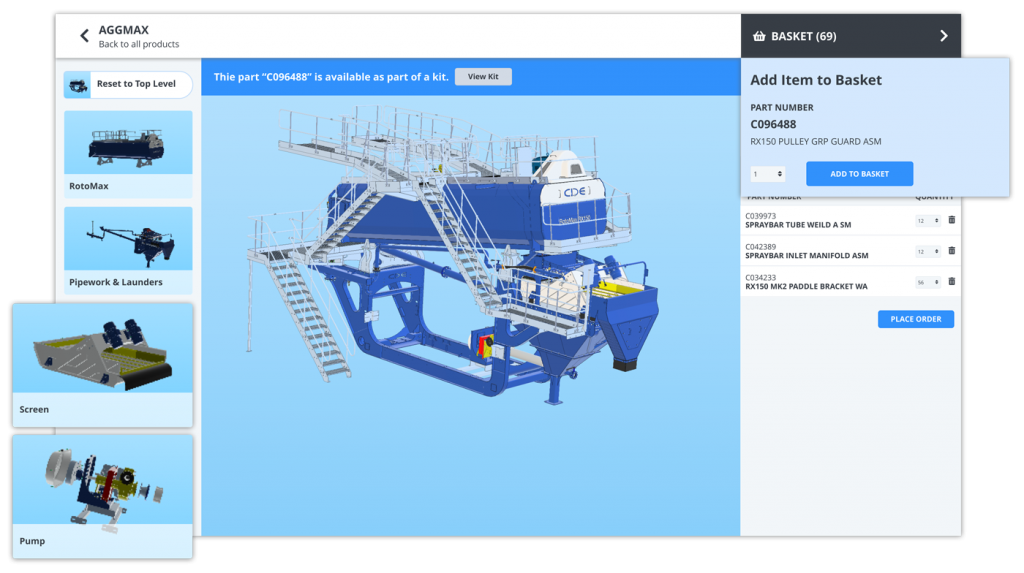
Rather than navigating through volumes of content to find a flat PDF or a 2D exploded-view diagram, users rotate, zoom, and click directly on components within the 3D model to order parts and kits. Selecting the part surfaces its part number, description, pricing, and ordering options, all in one place.
The underlying logic is simple: we live in a 3D world. When a technician needs a part they can identify it confidently themselves and request a quote or place an order at a time that suits them. No cross-referencing. No binders. No pulling engineers into parts lookups. And a differentiated self-serve customer experience, meaning they will keep coming back.
3D vs. 2D vs. PDF: What Is the Difference?
Most manufacturers' parts documentation exists somewhere on this spectrum:
PDF Parts Manuals
The traditional format. Static documents, typically exported from a CAD or technical publishing workflow, require users to cross-reference page numbers, callout numbers, and part number indexes manually. They cannot be updated without redistributing a new file, which means outdated PDFs inevitably float around the field and contribute to inaccurate parts orders, returns, and equipment downtime.
2D Interactive Parts Catalogs (EPC)
A significant upgrade. Hotpointed 2D exploded-view diagrams are linked to a live bill of materials; users click a callout on the diagram and the corresponding part highlights in the BOM, and vice versa. Content stays current, parts go directly into a cart, and the catalog lives online rather than in a file cabinet. This is the proven backbone of most modern parts catalog software, and it remains the right answer for a large portion of a manufacturer's content.
3D Interactive Parts Catalogs
The newest generation. CAD models are converted into a web-compatible format and delivered through a 3D web viewer. Users interact with the 3D model to locate components visually, then click through to part numbers, ordering, and supporting documentation. The identification experience is fundamentally more intuitive; studies cited by McKinsey and BigCommerce show 3D visualization boosts engagement and retention by 25 to 40 percent, and 40 percent of B2B buyers are now willing to make purchases over $500,000 through a self-serve digital platform.
How 3D Parts Catalogs Work
The workflow behind a 3D parts catalog typically starts with engineering data that already exists in most organizations:
- CAD models from your chosen design tools (for example Autodesk Inventor, SolidWorks, Solid Edge and Siemens NX) are uploaded to a system that converts them into a light web-viewable format that can be rendered in your web browser. Meta data is often extracted and used to apply automation to the process.
- The BOM is automatically extracted during the process, so the system already knows the part number, description and recommended quantity for every part in the machine.
- Intuitive 3D experiences can be created that will allow your customers to easily navigate down through assemblies and find the parts they need quicker than before.
- A 3D web viewer, embedded in a parts catalog platform, customer portal, or website, delivers the experience to dealers, technicians, and end users on any device.
- Selected parts populate a shopping cart and flow directly into an order or quote.
The key insight here is that this data already exists in most manufacturers' 3D CAD files. The problem has never been a lack of rich product information; it has been the absence of technology and workflows to make that information accessible to the people who need it.
The Real Cost of Poor Parts Identification
Parts identification problems are not a minor inconvenience. For some manufacturers, they are existential. The downstream effects hit three areas particularly hard:
-
Support operating costs skyrocket. When parts calls take 20 to 60 minutes and require multiple follow-ups, and when highly trained staff spend their time acting as search engines for missing data rather than generating aftermarket revenue, the math compounds quickly.
-
Equipment downtime costs customers money. Support delays mean machines stay offline longer. A customer whose equipment is down is quietly calculating whether your parts process is worth the wait.
-
Gray market competitors take revenue. When it is easier to find a similar part from a third party than to navigate your own parts system, customers will do exactly that. The impact reaches beyond lost revenue; it affects quality control and warranty coverage too.
There is also a hidden engineering cost that often goes untracked. Every parts lookup that escalates to the engineering team is an engineer pulled away from product development. The true cost of a broken parts identification process is distributed across the entire organization, not just the support team.
When 3D Makes Sense, and When It Does Not
3D is a strong fit when
- You manufacture complex equipment with large assemblies; thousands of parts, long service lifecycles, and significant aftermarket needs. The more complex the machine, the more visual navigation outperforms schematic lookup.
- You do not currently produce 2D exploded views or would like to stop producing them. Going directly from CAD to 3D visualization can be faster than building a traditional illustrated parts book from scratch.
- Your customer base expects a digital-first experience and will not miss printed PDF manuals.
- Your engineering team maintains consistent CAD data or is willing to invest in establishing the naming conventions and structure that make downstream automation possible.
3D is a harder fit when
- Your dealers and technicians expect printed PDF catalogs or require them contractually. 3D-only solutions do not translate well to paper.
- A significant portion of your documentation comes from component suppliers who provide PDFs rather than CAD files. You cannot build 3D models for parts you do not have engineering data for.
- Your CAD data lacks integrity; inconsistent naming, missing metadata, no hierarchy standards. Without structured source data, more effort will be required in the 3D parts catalog to ensure accuracy.
The Biggest Limitation Facing 3D Parts Catalogs Today
A typical manufacturer's parts documentation ecosystem looks something like this:
- Years of legacy content already exist in PDF or 2D interactive format. Migrating all of it to 3D is not practical, and in many cases is not necessary.
- Supplier-provided documentation, a Deutz engine manual, a Parker hydraulics guide, arrives as a PDF. The OEM does not have and cannot create 3D models for those components.
- Keeping 3D catalogs current requires ongoing CAD synchronization. When engineering updates a part, that change needs to propagate downstream automatically; otherwise someone must do it manually, which rarely scales.
Forcing a manufacturer onto a 3D-only platform means leaving significant portions of their content without a home or maintaining two disconnected systems. Neither option works well in practice.
Why Manufacturers Are Moving Toward Hybrid (2D + 3D)
The answer the industry is converging on is not choosing between 2D and 3D. It is leveraging a platform that handles both within a single, integrated system. The logic is straightforward.
A hybrid approach lets manufacturers keep existing 2D interactive parts pages and PDF content without disruption, introduce 3D visualization for new product lines or complex assemblies where it adds the most value, and house supplier-provided PDFs alongside manufacturer-created interactive content, all in one catalog. When a part is updated, that change reflects everywhere it appears across every assembly, every machine, every channel, without requiring manual updates in multiple places.
There is also a broader shift in expectations driving this trend. As digital twins of equipment become more common in engineering and field operations, end users increasingly expect the aftermarket experience to match that same level of fidelity. The parts catalog is becoming, in effect, a customer-facing digital twin. The manufacturers treating it that way are seeing support costs fall, aftermarket revenue rise, and customer loyalty strengthen in ways that go well beyond parts.
What to Look for in a Parts Catalog Platform
Whether you are starting with 3D, 2D, or both, these are the capabilities that actually matter when evaluating parts catalog software:
- Support for multiple data formats. Your platform should handle 2D SVG diagrams, PDFs, and 3D CAD models without forcing you to standardize everything first. Manufacturers receive PDFs from suppliers, spreadsheets from engineering, and CAD from their own design teams; the platform should work with all of them.
- Performance at scale. Complex machines have assemblies with tens of thousands of components. The platform needs to handle large models without degrading the experience for the technician trying to find a single part.
- Integrated ordering. Parts identification and parts purchasing should live in the same workflow. Every hand-off between systems is a place where customers give up and find another source.
- ERP integration. Real-time pricing and availability surfaced at the point of parts identification is what closes the loop between finding a part and ordering it.
- Access controls and content distribution. Different dealers, regions, or customer tiers often need access to different content sets. The platform should support that granularity without duplicating or fragmenting content.
- Interoperability. The parts catalog should plug into any customer-facing or support system; customer portals, inspection tools, install-base monitoring, e-commerce platforms. It is a hub, not an island.
The Bottom Line
An interactive parts catalog is a baseline expectation for aftermarket support. The manufacturers who treat their parts catalog as a gold source of truth, enriched with photos, weights, pricing, and availability, connected to their ERP, and accessible across every channel, are the ones protecting their aftermarket revenue and building the kind of customer experience that drives repeat equipment purchases.
3D makes that experience more intuitive for the right use cases. But the real opportunity is not 3D versus 2D. It is using a platform flexible enough to handle both, so manufacturers can modernize without leaving anything behind.
See It In Action
Want to learn more about how to take advantage a 2D and 3D integrated parts catalog platform?
Book a Demo or email us at sales@documoto.com to learn more.